
How to: Convert your store prices to multiple currencies with money.js + accounting.js + jQuery
When building stores, you will sometimes want to display the prices of your products in different currencies. Even if you will charge your customers in your own currency only, it’s never a bad idea to show an estimate of what a product would cost in your customer’s own local currency. It gives the customer a more secure feeling about a purchase and will take away a bit of uncertainty when they see an item they want to buy.
In this blog post I’ll show you an easy way to do just that: currency conversion with a few simple javascript libraries and a free exchange rate provider.
What you need to do to get started:
1 – first, add jQuery to your web page and grab a copy of the money.js library
2 – this step is optional but I highly recommend it: grab a copy of the accounting.js library so that we can easily format our prices matching the selected currency format. In Europe we use comma’s after all as a decimal mark while in the States there’s a dot in that very same place. The accounting.js library takes the pain out of formatting that kind of fun stuff.
3 – you’ll need a web page (what else?) where we can experiment or show different currencies for a product
Step 1: Link money.js to your web page
Start your engines! Add jQuery and the money.js library to your web page. We’ve used the minified version of the library to speed up the loading of the store. If you don’t need to look at the source of the library, go for the minified version as well. Make sure to also link up jQuery before anything else. We are using the Google CDN to quickly service jQuery to our users worldwide.
Here’s the code we used.
<script type="text/javascript"
src="https://ajax.googleapis.com/ajax/libs/jquery/1.7.0/jquery.min.js">
</script>
<script type="text/javascript" src="js/money.min.js"></script>
The money.js library itself is no more than 1.1 kb in size, which is – well – not much to load.
Step 2 (optional): Link accounting.js to your web page
As I said before, this step is optional, but I would suggest using the accounting.js library to format currencies in a correct manner.
<script type="text/javascript" src="js/accounting.min.js"></script>
Step 3: Convert your price into different currencies
This step is actually easier than one might think, so bear with me and let me try to explain how to build this up.
First, we will tell jQuery to start working once the page has finished loading by wrapping our code in the .ready() event.
$(document).ready(function(){
  //load this code once the page is loaded
});
Then, we will tell the money.js library what our default currency is. In other words, we need to tell the library what the currency of the price is we want to convert, so that it knows what exchange rates to apply.
fx.base = "EUR";
fx.settings = {
    from : "EUR"
};
Then comes the cool part. We’ll query the open source exchange rates API to get current representative exchange rates for all currencies. After grabbing the json-feed, we’ll add the exchange rates to the money.js library.
$.getJSON(
          'http://openexchangerates.org/latest.json',
          function(data) {
              // Check money.js has finished loading:
              if ( typeof fx !== "undefined" && fx.rates ) {
                  fx.rates = data.rates;
                  fx.base = data.base;
              } else {
                  // If not, apply to fxSetup global:
                  var fxSetup = {
                      rates : data.rates,
                      base : data.base
                  }
              }
          }
);
Once we have those rates, we can start converting our price into any exchange rate we want:
var USD = fx.convert(amount, {to: "USD"});
We’ll also format that currency into a nice recognizable format:
USD = accounting.formatMoney(USD, "$ ", 2, ",", ".");
That’s it, now we can show this estimate to our users by appending it to our page, in a list if you want:
$("ul.currencies").append("<li>USD estimate: " + USD + "</li>");
The complete code and example could look more or less like this:
<!DOCTYPE html>
<html>
<head>
<title>Currency Conversion Tutorial</title>
<script type="text/javascript" src="https://ajax.googleapis.com/ajax/libs/jquery/1.7.0/jquery.min.js"></script>
<script type="text/javascript" src="js/money.min.js"></script>
<script type="text/javascript" src="js/accounting.min.js"></script>
<script type="text/javascript">// <![CDATA[
    $(document).ready(function(){
      fx.base = "EUR";
      fx.settings = {
        from : "EUR"
      };

      var amount = 9.99; //in SolidShops, you could use: {{ product.price }}
      // Load exchange rates data via the cross-domain/AJAX proxy:

      $.getJSON(
          'http://openexchangerates.org/latest.json',
          function(data) {
              // Check money.js has finished loading:
              if ( typeof fx !== "undefined" && fx.rates ) {
                  fx.rates = data.rates;
                  fx.base = data.base;
              } else {
                  // If not, apply to fxSetup global:
                  var fxSetup = {
                      rates : data.rates,
                      base : data.base
                  }
              }

             // now that we have exchange rates, add a few to our page
             var USD = fx.convert(amount, {to: "USD"}); //13.22784197768393
             var GBP = fx.convert(amount, {to: "GBP"}); //8.567532636985659
             var JPY = fx.convert(amount, {to: "JPY"}); //1028.1670562349989

             // we can now use the accounting.js library to format the numbers properly
             USD = accounting.formatMoney(USD, "$ ", 2, ",", ".");
             GBP = accounting.formatMoney(GBP, "£ ", 2, ",", ".");
             JPY = accounting.formatMoney(JPY, "¥ ", 2, ",", ".");

             $("ul.currencies").append("<li>USD estimate: " + USD + "</li>");
             $("ul.currencies").append("<li>GBP estimate: " + GBP + "</li>");
             $("ul.currencies").append("<li>JPY estimate: " + JPY + "</li>");
          }
      );
    });
// ]]></script>

</head>
<body>
      <h1>€ 9,99</h1>
      <ul class="currencies"></ul>
</body>
</html>
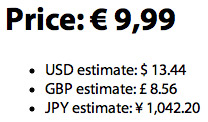
The output of the final currencies list looks like this:
I hope this gives you at least a little bit of inspiration to get started with converting your prices in your store.
Please post a comment if you have any questions or if you have used these amazing libraries to build better stores for your clients. I’d love to see what you come up with!

Let's get social shall we?
We'd love to know what you think. Join the conversation about your hosted e-commerce solution.